Ramps, Fingerling Potatoes & Chevre Frais

Several years ago, when I had begun to try various and “new to me” foods, I came across something called a “ramp”.  I was walking through the WNC Farmers’ Market in Asheville, NC at the time and saw these leafy, wild onion looking plants bunched up for sale.  The dirt was still on the tubers.

I asked what they were and it was explained to me, but seeing that they have a unique flavor and the parts are oddly put together (imagine the tuber of a wild onion, with a flat green leaf growing above ground).  In flavor, they are as strong and unique as garlic, but they don’t taste like garlic.

Fortunately, I did not google for recipies (yet), so I tried the following:

The Market had provided me with fingerling white potatoes.  I believe someone had named them “gravelling” potatoes, since they were small like pebbles.  On that trip, I think I had also travelled down into South Georgia, to Thomasville, and the “Sweet Grass Dairy” and had bought various cheeses, including some Chevre Frais (fresh, soft goat cheese).

So on a skillet, I began to saute the ramps (tops and tubers, chopped) in olive oil.  After they began to soften, I added the potatoes which I had sliced, and then as the potato edges began to brown, I added the Chevre Frais, along with a little Half & Half which formed a thick cream sauce for the ramps & potatoes.  Salt & pepper to taste.

This went well with a pan fried steak.  Steamed broccoli or broccolini, or a salad would compliment this also.

I found that I could clean and freeze the ramps for later use, which could last into the fall easily.

http://ncalternativecropsandorganics.blogspot.com/search/label/ramps

2010 Horizon Report – Executive Summary – Summary

2010 Horizon Report

KEY TRENDS

Four trends have been identified as key drivers of technology adoptions for the period 2010 through 2015:


  • The abundance of resources and relationships made easily accessible via the Internet is increasingly challenging us to revisit our roles as educators in sense-making, coaching, and credentialing.
  • People expect to be able to work, learn, and study whenever and wherever they want to.
  • The technologies we use are increasingly cloud-based, and our notions of IT support are decentralized.
  • The work of students is increasingly seen as collaborative by nature, and there is more cross-campus collaboration between departments.


Critical Challenges

  • The role of the academy — and the way we prepare students for their future lives — is changing.
  • New scholarly forms of authoring, publishing, and researching continue to emerge but appropriate metrics for evaluating them increasingly and far too often lag behind.
  • Digital media literacy continues its rise in importance as a key skill in every discipline and profession.
  • Institutions increasingly focus more narrowly on key goals, as a result of shrinking budgets in the present economic climate.


Technologies to Watch

The six technologies featured in each Horizon Report are placed along three adoption horizons that indicate likely time frames for their entrance into mainstream use for teaching, learning, or creative inquiry. The near-term horizon assumes the likelihood of entry into the mainstream for institutions within the next twelve months; the mid-term horizon, within two to three years; and the far-term, within four to five years.

On the near-term horizon — that is, within the next 12 months — are mobile computing and open content.

The mid-term adoption horizon is set two to three years out, where we will begin to see widespread adoptions of two well-established technologies that have taken off by making use of the global cellular networks — electronic books and simple augmented reality.

On the far-term horizon, set at four to five years away for widespread adoption, but clearly already in use in some quarters, are gesture-based computing and visual data analysis.


Jing / Screencast – Screen Capture

JING is a free screencapture (still images and video w/audio) utility from TechSmith (Camtasia, Snagit).  You get the utility, 2 GB of storage on Screencast.com and limited bandwidth each month for free.  Upgrading to Pro for $14.95 per year gives you 25 GB and 250 MB per month bandwidth.  Pro also gives you some added options (to save video in either SWF or MPEG formats).

On Screencast, you can create public, hidden, password protected and authenticated folders.  An authenticated folder requires the viewer to have a Screencast account and login with it.

Sharing images or videos is easy.  You can cut-n-paste a short URL into your email, or link on a web page, or embed the image or video in a page by pasting the code.

Start Jing and a little yellow sun icon appears at the edge of your monitor window.  Click on it when you want to capture an item, check your history, and/or change some program options.

Selecting the capture area is easy.  Either click and drag the cursor to create a capture window, or click if the selected viewing window is highlighted already.

[Screenr.com provides similar video capture from your PC screen but requires a Twitter account.]

Word – Tips & Tricks


  • Changing Case Shortcut
    • Shift-F3 toggles text between first letter uppercase, all upper case, and all lower case.
  • Merging Table Cells without Merging Rows
    • Click on Design tab and then choose the Eraser Tool.  Click and drag on the table border that you want removed (e.g. drag down between two columns, and the result will be the columns merge content without merging rows)

learncentral – Elluminate

Host Your Own Webinars (free)

LearnCentral allows educators to use a free public Elluminate room to hold large webinars or group meetings.  To qualify, the events must be 1) education-oriented and non-commercial, 2) free (you’re not charging those who attend), 3)  recordable, and 4) open to anyone to attend… ” 

Bill Gibson | LearnCentral

Also…

With Elluminate vRoom (info & registration) you can meet online FREE with up to two others.

Go!Animate


A conference presenter pointed out this site. I visited the site, signed up for a free account, and then went about the task of creating a cartoon alter-ego (me) and then developing a few cartoon scenarios in which I was the star (or at least a willing participant).

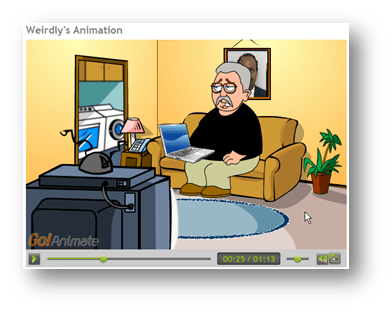
In the animation (shown left), I talk on the phone (using my real voice, which I created using Audacity, and then uploaded as an mp3 file), I have a laptop computer, which I got from the Microsoft Office digital clipart collection, and even have our CIO’s picture on the wall behind me, and above the sofa.

The interface is easy to use. The actors have a set of pre-programmed actions and movements, so you don’t have to figure out how to make them sit, walk, run or talk.

Animation has “attention grabbing” capabilities, but this would also be perfect for young people to express themselves in a less threatening way. You could have them create situations for the actors and then develop to a finished presentation to be shared.

Click on the animation photo to go view it on GoAnimate, and then try it yourself.

I Read the Paper, “Worst Ice in 25 Years…”

Let me say that when I woke up this morning, I had no clue that I would pick up the front page of a Swedish newspaper and be able to read the stories listed there. I don’t speak or read Swedish. It wasn’t even my intent to read any newspaper. I actually started my journey looking for new things in educational technology.

One of the tricks I’ve learned is that if you can find an educational conference (probably any type of conference) listed online, you can quite often google for their keynote speaker, or on a presenter who appears to be giving an interesting presentation, and find their materials online (if not on the conference web site, then on the presenter’s site). Many presenters are often quite generous in sharing what they are currently interested in, with anyone who asks them a question. And, several times, I’ve perused the materials that they plan to share with upcoming conference attendees.

So, I found a conference (MACE http://www.mace-ks.org/maceconference.htm), and saw the name of the keynote speaker, Janet Wozniak. Now until I started to write this article, I really did not intend to pursue if Wozniak was in some way connected to one of the Apple creators, but googling produced this:

http://twitter.com/JanetWozniak
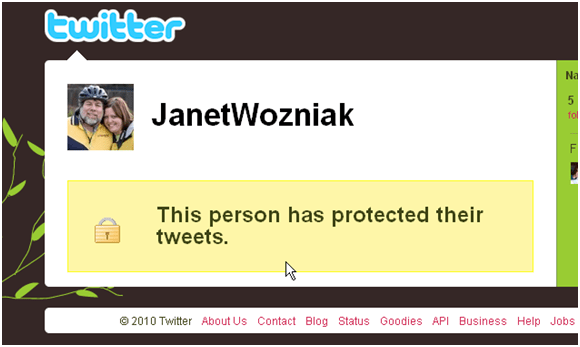
If you note than in the bottom right corner of the image above, is a link to “Jobs”. A coincidence… nah, it doesn’t have anything to do with Apple co-founder Steve Jobs.

If you google on “Wozniak Apple” you find several entries, but this one was the most helpful. You see that he has been married four times, and the latest is “Janet Hill” Wozniak. You also get a picture to compare with the one above.

http://en.wikipedia.org/wiki/Steve_Wozniak

One of Janet’s handouts, in PDF format, was called “Think Back” and the first link was to the following:

http://www.newseum.org/todaysfrontpages/flash/

I clicked on the link and first chose the News & Observer, and next the Fayetteville Observer, but before I was through, I saw that you could also find papers around the world and so I chose Europe and eventually the Sundsvalls Tidning (why I don’t know).

NEWSEUM.ORG PRESENTS “TODAY’S FRONT PAGES”

Interactive map of the newspapers that are participating (France obviously has a problem.)

http://www.newseum.org/todaysfrontpages/pop_up.asp?fpVname=SWE_ST&ref_pge=map&tfp_map=Europe
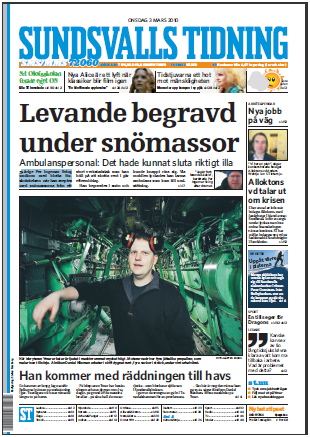
I didn’t have a clue as to what the articles were about, at first.

I usually go to Babelfish for my translations, but they did not have a Swedish to English translation, so I found “Google Translate” and selected the Swedish to English option: http://translate.google.com/#sv|en|

I began to type in the words from the page, and didn’t even have to enter the special characters (although I’m pretty sure you might get a better translation if you did).

Here is part of what I typed into the translation window:

som blockerar sjofarten i Sundsvallsbukten.

I gar var de tvunga att ga in i Tunadalshamnen for att proviantera.

– Det har ar nog den varsta isen pa 25 ar, sager Alnobon Daniel Nasman, forste maskinist pa Ymer.

And here is what began to appear with “Instant Translation” turned on:

that block shipping in the Bay of Sundsvall.
Yesterday, they had to go into Tunadal harbor for provisioning.
– This is probably the worst ice in 25 years, “says Daniel Alnobon Näsman, second engineer officer on Ymer.

Having read most of the front page article, and understood it, with the help of Google Translation, I knew the ship, the Ymer, was an icebreaker, so I googled on “icebreaker Ymer” and found the following pictures and info:

http://en.wikipedia.org/wiki/Ymer_(icebreaker)

and a video tour via YouTube: http://www.youtube.com/watch?v=fzKKiXdUA0k

Sundsvall, and Tunadal harbor (via Google maps): http://maps.google.com/maps?source=s_q&hl=en&geocode=&q=Tunadal+harbor&sll=37.0625,-95.677068&sspn=33.160552,56.337891&ie=UTF8&hq=Tunadal+harbor&radius=15000.000000&split=1&hnear=&ll=62.418996,17.446289&spn=0.151329,0.44014&z=11

So, without being aware of it, I had not only discovered one of the “new things in educational technology,” I had actually put it into practice.

YouTube Closed Captioning – How Easy is That!?!

I was listening to the Cool Teachers Podcast #36, and they mentioned (in passing) that there was a nice feature in YouTube that made it easy to append captions to your videos.  I’m not sure why I “glammed” onto that bit of info, since I have only uploaded two (now 3) test videos, and that sometime ago.

I had a short video that I had created a long time ago, showing how easy it was to create a professional looking video using Visual Communicator.  I pulled up the video and clicked on the Caption button (logged in).  I played the video several times to complete my transcription in Word (had to convert to a simple text file).

Take a look.  YouTube synced the timings after I uploaded the captions text file.  *I tried a somewhat longer video, and although not perfect, this process worked “darned well”.

This has got me looking at Dragon Naturally Speaking again (the Preferred Educational Version) because I want to try using that software to transcribe the audio ripped from a video.  I can use Cucusoft to rip the audio first, and Audacity to convert from mpeg to wav, if necessary before passing it through Naturally Speaking.  If it all works, it would be the really easy way to get Closed Captioning on alot of video quickly.  -bg2