
Voice to Text Software

Voice to Text Software


Just before the holidays I got up early one morning and was watching television in the early morning hours. During a commercial break I saw an advertisement for Dragon NaturallySpeaking. There was a special holiday offer for the software. It was only $49 for the standard version and it said it came with a microphone and headset.

I didn’t write down the web address, but, I did make a note that part of it was “/holiday”. I figured I could google for the address. Later that morning at the office, I found the web address for the company, which is Nuance, got my Visa card out, and put in an order for the product. As I have said previously, the Standard version was only $49, but if you ordered an extra copy, you could get the extra copy for only $39, and that there would be no shipping charges apply to either.

The order was put in on the 17th of December, just a week before Christmas, and I did not expect to get it before the holiday was over. But the following week, on Tuesday after 6 PM, there was a knock on the door and the delivery man handed me the package and hurried quickly away.

A little later, I was unpacking one of the software boxes, and found that there was a headset included along with the software. I put the CD in my laptop and ran the setup, which probably didn’t take more than about 10 minutes. I then plugged in the headset and began to try out Naturally Speaking.

I was both surprised and satisfied with how well the software worked. I began to train it on how to understand my Southern drawl. The software had me read several passages which were supposed to help it understand me better. The program will also ask if it can look through your e-mail or Word documents and by seeing the words and word combinations that you use, supposedly, it can better understand you when you speak.

I worked with the software on my laptop over the holidays, and this morning I installed the other copy on my office PC. I’ve been very pleased on how well it understands what I am saying and what I wanted to do when I give commands. There is a learning process for you to understand just how to ask for certain things. For example, enclosing items in quotes, in parentheses, bolding or italicizing a phrase, or capitalizing all the letters in a word or phrase requires you to learn just how to ask.

There are several versions of NaturallySpeaking and it appears that the Standard version does not allow you to import audio. The Preferred version does. If you use the preferred version, you would be able to record your dictation on a voice recorder and then run the audio file through NaturallySpeaking.

Except for a few hiccups, this entire posting was created in Microsoft Word 2007 and then posted to this site.

YouTube Videos

Here are a couple of links to YouTube videos that were used as examples in a session at the SACS Conference in Atlanta.

I like this Midnight Train to Georgia video for several reasons:  Recorded at the end of a hallway, Sarah, a strong vocalist  (Janis Joplin-escue with Bettie Page hair), multi-cultural collab, with humor… whooo, who!  Sarah could have stomped all over her partner, but didn’t.  This is “why” YouTube was made.  *I listened to several other of the videos posted by “seeso”.  This is another awesome collab with a different partner:

Your Precious Love

At the SACS Conference in Atlanta

It is 12:20 pm on Monday and I am basically alone at the SACS Conference.  I’m sitting in the Hilton on the 3rd floor with only one person in sight.

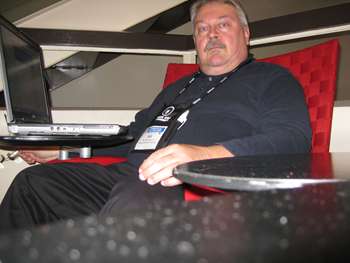
I found a red chair, modern, with a swivel desk that allows me to sit and type on the laptop via WIFI and WordPress.  I took a picture of myself in the chair, which I will add to this posting later.  Heck, if I can find my camera connector, I may do it now.

Okay.  It took me about 10 minutes to take the pictures, upload & modify them and add this pic to the posting.  Fat Man in a Chair.

I sat next to Suzanne in the last meeting and did not even recognize her for about 5 minutes.  YouTube.

ISSUU: Get Your Very Own Shelf Today

logo.gif Issuu Fresh Off the Press
Shelf It! It’s Free

New Issuu Shelf lets you publish your entire library directly to your website.

shelf_news.png

Embed Issuu Shelf on your website or blog and instantly add publications directly from Issuu.

Try Issuu Shelf now

line385.gif

In Other News

Half a Billion Unique Page Views and Still Going…
Read

TIME.com Selects Issuu Among This Year’s Best Websites
Read

Penguin Creates Interactive Reading Room With Issuu
Read

Creating a Table of Contents with Issuu Hyperlinks
Read

Subscribe to get the latest news.

line170.gif

Follow us on Twitter: @issuu
line170.gif

Need help?
Ask us a question

open.php?u=32202d765113057ef2a0ae770&id=7c85faa390&e=ec511428e7

Checkbox Select-All for Browser.

If you ever use a form that requires you to select/de-select a number of checkboxes, and the programmer hasn’t included a “Select-All” button on the page, then you might want to create a browser bookmark that will do the job.

I’m not sure how to create a Bookmark or Favorite from scratch, so I just go to any web page and click on “Add to Favorites…” or “Bookmark This Page.”  After the item is created, I right-click on it and go to Properties.  I change the name of the bookmark to something like, “Checkbox Select-All” and then I replace the existing URL or Location field with the coding shown below.

Here is the code:>>==>

javascript:function%20checkem(){var%20d=window.frames[0]?content.document:document;for(var%20x=0;x<d.forms.length;x++){var%20cSet=d.forms[x].elements;for(var%20i=0;i<cSet.length;i++){if(cSet[i].type==’checkbox’){cSet[i].checked=cSet[i].checked?false:true;}}}}void(checkem())

<==<<

Then when you go to a form that requires you to check all the boxes, just click on the bookmark and the boxes will be selected.  Again, and they will be un-selected.

Waiting.

I rarely have to be somewhere “on time.”  I’m pretty sure my friends, especially Deborah, and Jeff, would say that I’m almost always late to any event or activity.  This has been the case most of my adult life, but oddly enough this was not how it was during my childhood.

Anytime that there was an appointment, such as a visit to a doctor’s office, my mother and I would arrive at least 20 minutes early.  And, according to my mother’s internal clock, this would be equivalent to being late.  I knew, in the way she acted, that we should expect to apologize for our tardiness, even though 20 minutes early has no hint of being late.

Strangely enough, after I became a Christian, this internal desire to not displease others left me.  I rebelled against the feelings that I had experienced as a child, in “never being early enough.”  Perhaps that was “never being enough.”

I hated myself growing up.  It is amazing that I turned out as well as I did, despite the glaring holes in my personality.   Fortunately, the same desire to please others, especially my mother, kept me relatively “in check.”  I didn’t try drugs in high school.  It wasn’t easily available at that time, and only imbibed, “Boone’s Farm” Apple, and Strawberry wine on occasions, such as Prom.

BK ReplacEm, a text replacement utility.

I have used the little text replacement utility, BK ReplacEm, for quite a few years now.  Not so much in the last year, since we have integrated/automated our Banner (Student Information System) and Blackboard (CMS), but it was indispensible for several years.

Before the Integration, I had to generate an student enrollment file for placing all students in all courses within our Blackboard System.  The file was quite large and “cleaning it up” was necessary before running it through Bb. 

MS Word was useless in dealing with this file.  It would bog down and fail to complete the process when I attempted the “search/replace” function.  But, BK ReplacEm quite often would complete the process so quickly that I was unaware that it was through.

The utility also offered a powerful variable text/phrase replacement function that meant it could work miracles when searching for variable length or content strings and then performing replacement.  And, you could point it to more than one file at a time.

I just noticed that BK ReplacEm is now called “Replace Text” and you can download it to use “freely” at    http://www.ecobyte.com/replacetext/ .

*I copied the groups.bkg file from my BK ReplacEm folder into the newly created Replace Text folder.  My groups came over without a problem, and I ran one of them and it worked just as always.

**Bill Klein created a “paper clip” utility, not showy, but useful in a small way, over and over again to many people.  Thanks!

Will you take care of my digital presence when I’m gone?

It is so easy for a digital presence to be wiped out, and become totally unrecoverable.  But, I’m beginning to see that developing a digital presence is much like any other human activity.  We are born alone, and die alone, and we struggle to be heard during the journey.

A blog site, especially one developed with an application such as WordPress , can become quite reflective of the person who owns it.  There are words, both written and spoken, images, still and in motion, and we leave behind items that must have been important to us at some point, but may be discarded later.  We can choose which facets of our personalities to show to the public, and which to keep private, and sometime we might show our private selves, when it would be best to keep silent.

I have on my coffee table my mother’s high school diploma.  The paper stained and brittle.  It has the words, “Swansboro High School” in large letters arcing like a rainbow.

Faculty WordPress Site

Here is a link to a dummy faculty site that I created.

http://faculty00.wordpress.com/

One of the first things that I would like you to notice, is that the instructor could create a posting “category” for each course they taught.  That way all of their students could subscribe to the course’s RSS feed, and would receive any new messages that had been categorized for their course.  *If email was “down,” as sometimes happens, it might be that this RSS feed would still be available (in times of emergency).