Logitech Z515 Wireless Speaker

I bought a small Logitech Z515 Wireless (Bluetooth) speaker a few months ago. I’ve got it in the office today, and have it hooked up to my PC.

One thought would be to take it with you and have a class outside. If you can figure out how to use your mobile device (iPad / Android phone, etc.) as a microphone, then you could put your wireless speaker at the “back of the class” and that would make it possible for your many students spread out under trees, etc. to hear what you are saying… not just those up front. I guess you could use this indoors for the same reason. Place the portable speaker at the back of the class to help students there hear as well as those at the front of the class.

ADDENDUM:  How disappointing!  I tried various apps, both for iPad and my Android phone and none of them worked, or worked along with pushing the audio via Bluetooth to the wireless speaker.

It would be nice to be able to use your iPad to view notes while giving a lecture and using it’s microphone to push audio out to (one or more) a wireless speaker (via Bluetooth).

Posting Using My Revue & WIFI Keyboard App from My EVO

Okay, I have found that my Logitech Revue System is good for something that I have been waiting for for a long while… in Internet time.  I am using the Chrome browser on my Revue System to connect back to my EVO phone, and am creating this blog posting.

I have been waiting for a Bluetooth driver and keyboard that would allow me to connect to the EVO so that I could take notes.  I tried out the WIFI Keyboard app several months ago and it worked, but I saw no advantage to having to have a PC or laptop run a browser, just so I could connect back to my phone and type on the small screen there.  But, for $99 for the Revue and already having the 32″ HDTV, and the app being free, viola!  This works great.

Changes in Technology

Changes in Technology

I’m not sure why this morning, Saturday, July 2nd, 2011, I decided to visit the Cumberland County Library. I guess that I just wanted to touch base with an old familiar environment.

Several years ago, but not more than 10, I was doing genealogical research in the “North Carolina” Room of the New Hanover County Library in downtown Wilmington, NC, when I came across an account of the Great Fire of Wilmington. The Great Fire occurred on Sunday, the 21st of February, 1886. The fire started aboard the Bladen, a paddle wheel steamboat, which was nearing the end of its journey from Fayetteville. Fire was found in bales of cotton located near the steamer’s boiler. A strong, almost gale force wind, was blowing across the Cape Fear River and quickly whipped the flames from the bow to the stern of the boat. Fortunately, many small vessels had been dispatched from both sides of the river and all the passengers and crew were rescued. But, the flames spread from the burning boat, to other vessels along the waterfront and then to much of the “blue collar” section of the city. By the time the flames were brought under control, an estimated $1 million dollars in damage had been done.

Before reading the Great Fire article, I had never imaginedMicrofilm reader that steamboats could or did travel up and down the Cape Fear River between Fayetteville and Wilmington, NC. But, my interest was piqued, and I started reading the few books, and a myriad of newspaper articles over the next years. I visited the Cumberland County and New Hanover County Libraries repeatedly & frequently, Wilson Library in Chapel Hill, and even did research in libraries in Georgetown, SC, Augusta, Darien and Savannah, GA.

When my research started, I would pore over pages of old newspapers on microfilm, zooming in and out, and sliding pages from left to right and back again, and up and down. I might transcribe an article, using a mechanical pencil, or note a date, page and column location and print out the article for 25 cents or a dime.

I honed my research parapnewspaper pagehernalia down to close reading glasses, a mechanical pencil and eventually a digital camera. I found that I could take a picture of the film reader screen and transcribe later when at home. Every digital image was a saving of a quarter or dime.

A short time ago, I received an HTC EVO 4G from work. The EVO is a much better smart device than my previous phone, an HTC Hero. Its screen is larger, which means I can type more easily, with less “fat fingering.” The camera is 8 megapixels compared to the Hero’s 5. And, work provided me with the capability of creating a WIFI hotspot with the EVO. This means that I can use my 1st generation “WIFI only” iPad and link it to the Internet via the EVO. The nice thing about the iPad is that I have an Apple Wireless Keyboard (Bluetooth) which allows me to easily “power” blog, email or word process.


Working at Subway!

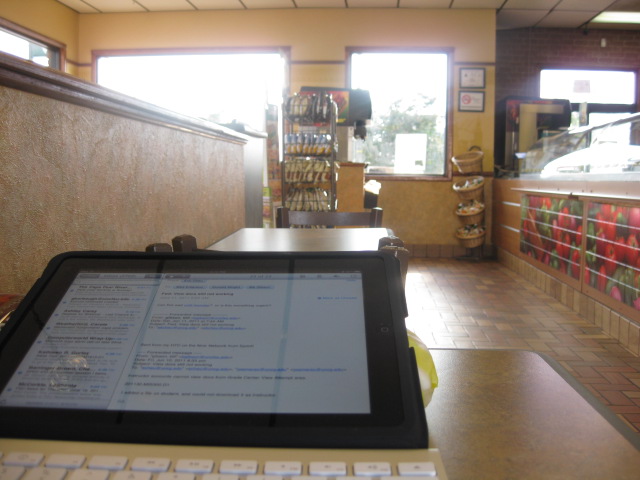
It came to me that there are psychological reasons why people don’t do work/study from some locations. I decided to bring my iPad into Subway and see what kind of feelings and thoughts that were generated, that might not be generated if I was working from the office, home, or a classroom

I just had a 6″ Turkey, Bacon, & Avocado sandwich on oat bread. It was good. I ordered a 6″ sandwich, but “mindlessly” watched the girl fix a 12″ sandwich. She asked if I wanted it toasted, to which I said, “No.” So, I watched her pop it in the microwave. She did get all the veggies that I requested correct, and I enjoyed the toasted sandwich. I really don’t need the other 6″ sandwich, but probably will eat it for lunch or dinner tomorrow.

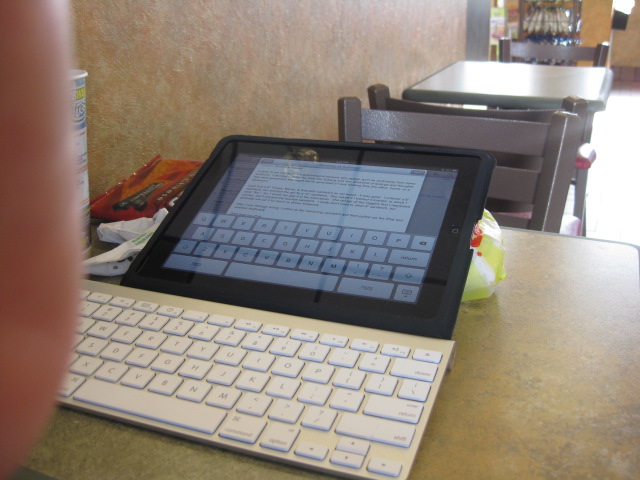
After I was through eating, I rolled up the remaining sandwich and then pulled

iPad & wireless keyboard

out the iPad and wireless keyboard. As you can see I leaned the iPad against the remaining sandwich. I turned the table sideways, which I normally do even if I am not planning on testing out a new technique.

Lazy, Late Afternoon at Subway

It’s now 6:10pm on Thursday. The ceiling fans are lazily rotating as the Subway “guy” is talking to a woman and probably her daughter, as he fixes their sandwich. Some other customers, a family of four is approaching the door. The mother in a pink sleeveless top and shorts, the father, with blonde short hair, and sunglasses perched on top of his head, in khaki “Docker-type” pants.

Well, I see that I can write well. The customers and staff give me fodder for what I am writing about. “He want’s American on the ham, and Provolone on the… the woman tells the “guy”.

It is a relaxing time at Subway. It would be much busier, and probably not conducive to writing, at lunch time.

This test was a success. I am about to push this posting via email to my blog site.

Bill

Sent from my iPad

Addendum:  My original posting was without images.  It also went to the wrong blog because I entered the wrong email address.  Once home, I imported the photos from my camera to my iPad, but then found that there was no way to add them from the edit window of the WP interface via the iPad.  iPad also fought me from getting the photos to Flickr.  I eventually sent the images to the WP blog via email, and this morning, at the office, I added the images to my updated blog posting.

There’s Been a Change in the Weather, and a…

—Addendum to Original Posting—

I didn’t have time to check out my “downgraded” cable services fully yesterday morning, but I might just end up like Br’er Rabbit saying, “Please, oh please.  Don’t throw me into the briar patch,” when in reality that is where I am most comfortable & secure.

I hooked up the coaxial cable directly to my HD TV (returning the HD Cable Box & remote) and started the Channel Search.  Well, when I start to manually surf through the channels, the first thing I find is that 4.1 UNC-TV is in HD.  This is one of my favorite channels and I get it in HD under Broadcast Quality Cable.  Next, I found that 5.1 WRAL was also in HD.  Probably the local channel that I watch the most including both morning & evening news.  Several other local channels are available in HD.  And, I still get SyFy and AMC, but in Low Def.  So, heck, “throw me in the briar patch.”

I also watched another Netflix movie, an old “Alfred Hitchcock Presents” and part of an “Inspector Lewis” (PBS episode).  And… I don’t have to watch a bunch of useless commercials, nor have the Lower Third of the screen have their channel logo, or some other animated advertisement going on while I am trying to stay focused on the show I am wanting to watch.

— Original Posting Below—

Whether the Economy is going to improve or not, I have been spending in key areas which amount to major changes for me.

Just before Christmas, I decided that I would purchase a BluRay DVD player. I had put off getting into this technology since I had not “been into” buying DVDs as I once did. Early into my research I read a posting that said that the PS3 game machine had a excellent BluRay player. I am not into gaming, although I’ve wasted many hours, in the past, playing assorted games on my PC. So, I thought, “Hmmm… a BluRay player and a game machine for just a little more than a player.” I really had not priced low-end BluRay players, so the price of the PS3 sounded reasonable.

I bought one “shoot/kill” game and a BluRay remote for the PS3 when I purchased the PS3 just before Christmas. The game was okay and I enjoyed playing it, but I’m not addicted to them as I have been in the past.

I had told Deb that a BluRay movie would be a good Christmas present for me, “Quantum of Solace,” the sequel James Bond film to “Casino Royal” (Daniel Craig as Bond.). *I really like Craig as Bond. Watching the Bourne movies, I had thought to myself, “Now this is the way Bond should have been portrayed.”

Surprise, Deb got me “Quantum of Solace” on BluRay disk. *I do not see a difference between the HD TV stations and the BluRay movie quality, but the crystal clarity of visual objects is fantastic. I need to get a sound system for my TV again.

Today (maybe yesterday) was the last day of a two year contract with Time-Warner for which I got all three services, Cable, Home Phone, and Internet for about $135 a month. A few days ago, I called the Time-Warner rep and downgraded/changed my service to just “Broadcast” stations (about 25 local) and upped to RoadRunner High Speed (10Mbps). This is supposed to be about $80 a month.

I don’t know if anyone will ever survey me on why I downgraded, but here are some of the reasons:

  • Over 200 channels, including some HD channels, of which I only watch about 20 channels (“Chiller” being the only non-HD channel that I regularly watch.)
  • The increasing invasiveness of the number and length of commercial breaks during movies/shows. Not only are there more commercials played, and played between shorter and shorter content segments, but they play the “same damned commercials over and over again,” often back to back.
    • I managed to get into the habit of muting the TV audio during commercial breaks. This is something that both relatives and friends have been doing for years.
  • The “SciFi” Channel became the “SyFy” Channel… moronic, but okay, until… the majority of weekly content became “ghosts & wrasslers”. What in the Hell does wrestling have to do with Science Fiction? *I know, it’s the audience demographics. I guess they could have added NASCAR racing and really made it a pleasure for me to not watch SyFy.
  • *This is not a reason for dropping Cable, but something that I do:  I “hate” the NC Education Lottery.  It’s just a sleazy process that has tied itself to a worthy cause.  So, when a Lottery commercial comes on WRAL, I automatically change the channel.  I often forget to come back to WRAL, even if I was engrossed in a show or movie.  I’m only one person, but if more did the same, maybe the State would finally get the message, “We don’t want a ‘damned’ lottery in this state!”

So, I had seen that I could play movies directly from my PS3 system. I hadn’t tried it (until last night). A week or so ago, Leo Taylor, a friend, mentor, & former boss, called me up and started telling me I should get Netflix. He was overdosing on watching movies. *Now this was unprompted. I hadn’t told Leo that I was thinking about trying this, and his call was “out of the blue.”

So, last night, I figured that I would see if Netflix movies via PS3 would work on the existing Earthlink High Speed Internet connection I had. I wanted to try it out before switching over the RoadRunner. It worked fine, once I figured out that the login name & password they were asking for (after I clicked on the Netflix icon on the PS3 screen) was a PS3 account (which I had not yet created) and not the Netflix account & password I had created the day before. *I watched “District 9” which was somewhat disappointing. What was the James Caan movie and then spinoff TV series about aliens (humanoid like) who came to Earth much like the aliens in D9? “Sam Francisco” being one of those alien-human appellations. You’ve got to know how to develop characters quickly, so that even though you’ve only seen them on the screen for a few minutes, you can cry when they die as if they were old friends. This rarely happened in D9.

Before I left for work this morning, I turned on the TV and noted that Time-Warner had already made the requested changes to my service (although I didn’t check the RoadRunner portion yet). I’ll have to hook the cable directly to the TV now and fish out the TV remote instead of using the Cable remote, which along with the HD box, I need to return to TWC this week.

So, I’ve dropped home phone (and let no friends or relatives know yet). On my birthday, I finally got online at Amazon.com and ordered a HTC Hero (Android) phone for 1 cent, with a $69 plan that eventually will probably cost $80 or $90 dollars a month, if I don’t call land lines. This plan gives me unlimited data, which is after all what I use the phone for anyway. *I’m going to see if I can make it easy to re-route my office phone to my cell nightly.

The Saturday before my birthday, I drove down to Lumberton. I was only going to take a test drive, but ended up buying a new white Honda Civic (with sun roof and 6 speaker system). I’m planning to give my Dodge RAM 1500 truck to my sister. Going from a 16 MPG to hopefully 36 MPG vehicle. The truck is larger and supposedly safer, but the little white Honda feels comfortable. Reminds me a little of the MG Midget that I had for a short time in my twenties. That was the lowest to the ground vehicle I’ve ever driven, and a lot of fun (a lot of headaches too).

Not a Geek, Not a Geek, …

Although I have worked as a Computer Consultant with Fayetteville State University for a little over 15 years, I do not think of myself as a computer geek. I do “play” with a lot of software and hardware that should make me realize that I am a “geek”, but it just hasn’t sunken in yet.

For instance, I was looking through a “Top 40” (or 45) of free apps for the iPad/iPhone on Friday afternoon. It was a countdown and when I reached #2, I had already installed about 6 or 7 new apps to my iPad. I say, “My iPad,” but it’s not actually mine. It is an iPad that was given to me, on loan, in order that I might test it out especially regarding the Blackboard Mobile Building Block. Chet Dilday has an iPad Project and this was one of the units from that work. It is a WIFI capable, but not 3G, system which means that when you get out of WIFI range, you’re not linked to the Internet, so the GPS and real-time mapping functions don’t work then.

I found that Blackboard was willing to provide either an WIFI iPad or an Android phone to me during the Mobile Building Block test period. Since I knew I was going to get an iPad from Dr. Dilday’s project, I asked for an Android device (whatever that might be). I wasn’t expecting much from the Android device, and the iPad was still in its early release, marketing frenzy hype. But, quickly I found that the HTC Hero (Android 2.1) was an exciting little piece of technology.

Let me interject that I’ve never owned a cellphone. I’ve used two cellphones extensively, but both were provided to me via work. The Hero came to me at a time, just at the end of 5 months of self-imposed emersion in the new Web 2.0 technologies. This emersion process, at least at the beginning was painful. It’s not easy for a 56 year old man to learn about, begin to incorporate & embrace some of the new ways of doing things. And, I am not a social animal, or not a naturally social animal and I enjoy my privacy.

So, getting the Android and iPad devices and beginning to get a real hands-on feel for Web 2.0, especially as it might be used in higher education, became “fun.” Frankly, though I don’t use the cellphone as a phone. It’s all the other neat, “hook me to the Internet” applications that I enjoy: email, news, simple Blackboard admin functions, recording live video while I’m out, posting to my blogs, either text or audio while “on the road,” etc.

If you had asked me if I wanted a GPS device, I would had said, “No.” But, if you ask me now if I have enjoyed using the Sprint Navigation (GPS & Map) functions on my phone, “Darned straight I have!” I even broke down and bought a phone mounting unit for my truck, and a USB power unit that plugs into the cigarette lighter so that I can recharge the phone while I’m out driving.

So, the #2 free iPad/iPhone app was “AirVideo.” You use the program to serve videos from your PC or Mac to your iPad or iPhone. It was simple and quick to install, a free app on the iPad and then a free “Air Video Server” app to run on my PC (or Mac, etc.) The free version limited the number of video files I could list in a folder, but “out of the gate” I was able to stream, without a hiccup, both MP4 and FLV files. You can actually download your YouTube videos in either of those formats.

Why might I want to stream video from my PC to an iPad? Well, video length might be one reason. YouTube videos are limited to 10 minutes, so you could stream an hour video from home.

On Saturday, I drove up to Smithfield, NC. I ate a little, shopped a very little, and stopped by the Johnston County Library in downtown Smithfield to see if I could hook up to their WIFI (if they had it, which they did). Okay, I see that I am “geeky,” because I walked in with my iPad and the Apple Wireless Keyboard and asked if they had a local history section, and if they had WIFI. I was directed upstairs, and told, “Yes, we have free WIFI.”

I saw nothing interesting, to me, in the local history section and so I went to a nearby table and sat down, noting that the chairs were simple, but stylish. I started the iPad and hooked to the Library’s WIFI, and then started the AirVideo app. It found my Air Video Server instance, which was running on my laptop in Fayetteville, and listed the two folders that I had made available. There was my SIFAT video (of my time at S.I.F.A.T. in Wedowee/Lineville, AL back in 1983/4) and it started playing with just a little hesitation.

I pull out my phone and start the USTREAM broadcast app, and here I am recording live video of me using the AirVideo app on my iPad, and the video that is playing is something that I recorded many years ago on a VHS Camcorder (converted to digital video a year or so ago). And, part of the video even shows the PC technology that was “state of the art” at that time, an IBM PC with a 10MB Winchester hard drive with a monochrome green monitor.

So, the Library chair was interesting to me and I looked for a manufacturer’s tag on the back. I attempted to turn the chair over, to look on the bottom, but because there were a few other Library patrons nearby, I chose a more discrete method of looking for the tag. I switched to the camera app on the phone and attempted to take a picture of the bottom of the chair. There was a 2 second delay from when you pressed the trackball button to take a picture, which was perfect for giving me time to get the phone positioned beneath the chair. The first photo was fuzzy, but there was a visible tag. The second photo was fuzzy also, but readable enough to get the first 5 or so character of the manufacturer’s name. I went to the Google Search app and started to enter the manufacturer’s name and the search suggestions popped up a name with “chair” appended to it. That was it, I had the chair manufacturer and I googled for their website.

I looked through their online catalog and did not find the exact chair and began to think that this might have been an old style that maybe the Library got at a discount. I then thought to see where a showroom might be located. To my surprise, the only showroom in the whole United States was in… Smithfield, NC. Must be the distribution point for America. I entered the address in the Google Navigation window and found that the showroom was only a few miles from where I currently was.

[Got sidetracked… with work.]

Dyson Fan, Where the Blades Are

I found myself in Best Buy on Saturday. I was looking for label printers. I had just come from Office Depot where I had seen several versions of both Dymo and Brother printers. The problem was that once you paid from about $69 to $149+ for the label printer, you would pay an additional $22 to $27 for a label/ink cartridge. I whipped out my smartphone and found it’s calculator. 312 labels equated to about $.10 per label, which I thought expensive.
I was looking to see how “cost effective” printing QR Code labels would be. I found one label printer at Best Buy and not satisfying.

I looked at cameras, such as the Flip video.

At some point, near the cameras and phones I came upon a display of two Dyson air-multiplier fans which were busily pushing a refreshing breeze. Like a child, I was fascinated. I finally put my hand through the portal, almost expecting an invisible blade or electrical current to shock me. It then dawned upon me that no business would place such a hazardous device where the public could easily get to it.

Not knowing how the fan actually worked, I had imagined some science fictionesque works, based up speeding up the flow of ions. The technology which will send and return earthlings between Earth and Mars. Or perhaps upon mag-lev technology that when repeated over a distance causes a projectile to reach unimaginable speeds easily.

I found a video on the Web where Dyson explained how his fan works, with a cut-away version of the contraption,

As soon as he mentioned the word “impeller” I realized that he had moved the fan blades from view. But there were still fan (impeller = fan) blades… in the base, which sucked in air and then through an intricate conductive system. I guess I could jadedly suggest that the impellers were probably extra vacuum cleaner components.

The image should be of an industrial fan turning somewhere, sucking in air, and pushing it through a winding conduit until out it comes, viola… no visible blades, at the point where the air is expelled.

Now that I think of what Dyson said in his explanatory video, that the air was multiplied perhaps up to 16 times, I realized that that number had already come to my mind. I had thought that the cost of a  Dyson fan at $320, would be about 16 times that of a normal $20 house fan.

— Smoke & Mirrors —

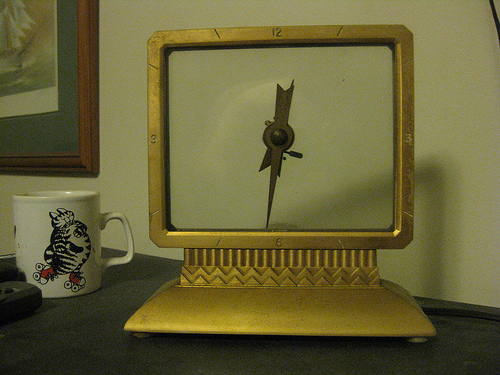
art deco electric clock

I realized that I had another example of something which appears (if it still ran) to work magically.  Some years ago, I bought this clock.  On the face of it there is no apparent gearing system… So, how does it work.  The hands of the clock and a simple rocker gear work with two panes of glass.  One of the panes of glass rocks up and down causing the gears of the clock hands to move.  As long as you keep the glass clean, it would be difficult to see that it was moving.

Using QR Codes for Political Mailouts, etc.

Richard Burr Committee Contact - QR Code Image If you want to make it really easy for people with smartphones to import your contact info, including phone numbers, email addresses and a URL to your web site, you should include a “QR Code” on your mailers and print ads in magazines (they could be used in other places as well, all sorts of promotional items).

I visited your site and copied some pertinent info into an online form for creating free QR Code images. This is what it produced and the images of my HTC Hero (Android) phone show how easily the barcode reading app imported the data.

Scan the QR Code image with your smartphone for more information.

Contact info easily imported into the phone.


A QR Code image can also contain all the pertinent info for a “calendar event” including: event title, location, date/time, and memo – phone number, link to web page.  Someone that wanted to add an event to their calendar would just need to scan the image and click on “Add to Calendar”.