
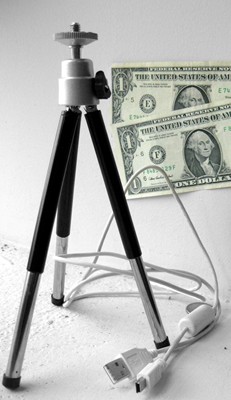
I have a Canon digital camera, a PowerShot SD1100 IS Digital ELPH (whatever that means), and I am happy with the quality of photos it takes, ease to carry around, and ease to transfer photos from the camera to my PC or laptop.
The photo above shows two items that I purchased,* to use with the camera. I bought a small tripod and a USB transfer cable at Dollar Tree at different times. But, you got it, the total for the two items was $2 plus tax. *[I am not sure if this was the original cable, but I did purchase an extra cable at Dollar Tree for this purpose.]
One can never have too many transfer cables. You need one at the office, one at home and one in your automobile. Although, no matter how many cables you buy, you may at some time end up with 3 cables at the office and none at home or in your car, when and where you need them.
The tripod allows me to set the timer on the camera and take this picture

instead of holding the camera and taking this one.

Okay, so I’ll admit that maybe a lens cover would help me take a better picture, but you get the idea.
Now why did I mention Subway? It is obvious that I do find comfort in food, but about a month ago, as I was eating half of one of their $5 foot-long subs, I realized what a generous sacrifice they were providing in these tough economic times. Where else could I get a filling lunch for just a little over $2.50? Surely, they also need to make a profit during this depressive period, but someone in authority made a decision to sacrifice… and, I appreciate the effort.
Bill
 Bill Gibson, II